![LOGO-White-RGB.png]](https://help.choozle.com/hs-fs/hubfs/LOGO-White-RGB.png?width=160&height=35&name=LOGO-White-RGB.png)
How to Access the Choozle Customer Portal
There are several ways to access the Customer Portal:
- Directly: Visit the Choozle Customer Portal.
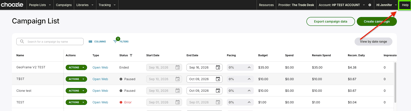
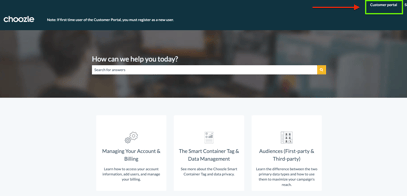
- From the Choozle platform: Click Help in the upper-right corner of the platform. This will take you to the Choozle Knowledge Base. From there, click Customer portal in the upper-right corner.
- From the Knowledge Base: Visit the Choozle Knowledge Base and click Customer portal in the upper-right corner.
First Time Using the Portal?
The Customer Portal requires a separate registration from your Choozle platform account. Your Choozle platform login will not automatically give you access to the Customer Portal.
- Click Register here on the Customer Portal login page.
- Complete the registration form using your individual work email address.
- Check your inbox for a verification email and complete your registration.
- Return to the Customer Portal and log in.
Watch the video below for a quick walkthrough of the registration process.
Submitting a Support Ticket
Once logged in, click File a Support Ticket and select the request type that best matches what you need help with.
To help our team review your request efficiently, include relevant details when applicable, such as:
- Advertiser or account name
- Campaign and ad group name
- A brief description of the issue or request
- Any error messages you're receiving
- Screenshots or supporting files
After submitting your ticket, updates and responses will be sent directly to your email inbox, where you can reply and continue the conversation.
Troubleshooting Login or Registration IssuesIf you have trouble logging in or registering:
- Verify your email address: Make sure your email address is entered correctly on the login form.
- Reset your password: Select Forgot password? on the sign-in page to receive a password reset email.
- Use an individual email address: Shared email aliases or distribution lists may encounter registration issues due to local firewall or automated verification settings. If this occurs, register using your direct, individual work email address.
- Check your inbox: Look for registration verification emails, password reset emails, and ticket responses. If you don't see an expected email, check your spam or junk folder as well.