![LOGO-White-RGB.png]](https://help.choozle.com/hs-fs/hubfs/LOGO-White-RGB.png?height=35&name=LOGO-White-RGB.png)
GUIDE:
Why Retargeting Matters?
-
Improves conversion rates: People who’ve already shown interest are more likely to convert when reminded. choozle
-
Increases ROI: Since you’re targeting users with known engagement, your ad spend is more efficient than broad or cold-audience campaigns. choozle
-
Enhances brand recall: Repeated exposure helps build awareness over time. choozle
-
Supports cross-selling and upselling: After a user converts, you can retarget them with related products or offer
Leveraging Retargeting
Tagging your Site
- You need the Smart Container Tag installed on your site. That tag builds retargeting profiles by recording visitors.
- Profiles collected by this tag remain valid for up to 90 days, which means your retargeting pool refreshes over time.
- There is no separate “data CPM” for retargeting since it uses first-party data — only media placement CPM applies.
Creating a Retargeting Audience
-
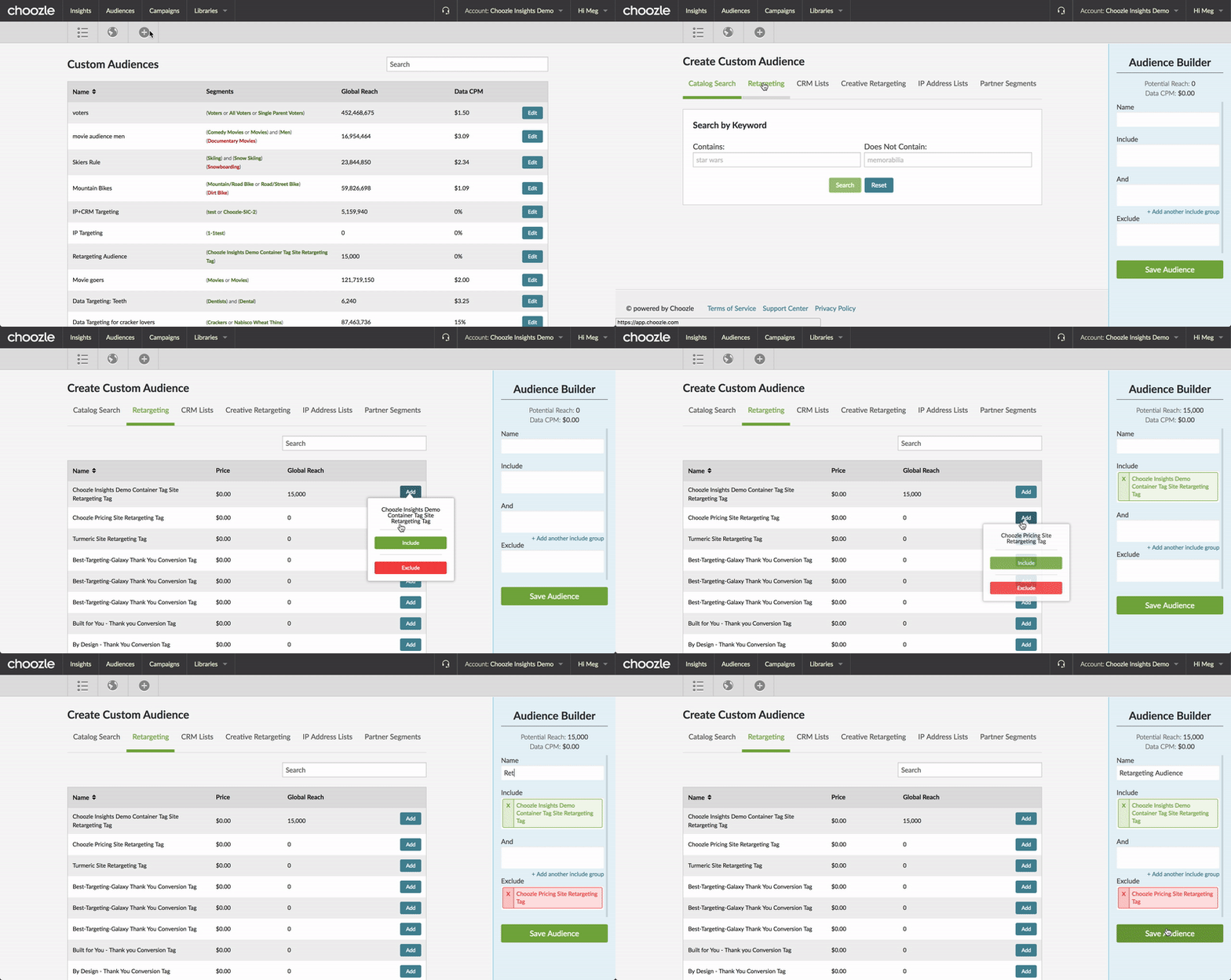
Go to Audiences → + → Retargeting in Choozle.
-
You’ll see different types of retargeting segments:
-
Select which segments to include or exclude, then save your custom retargeting audience
Implementing a Retargeting Campaign
-
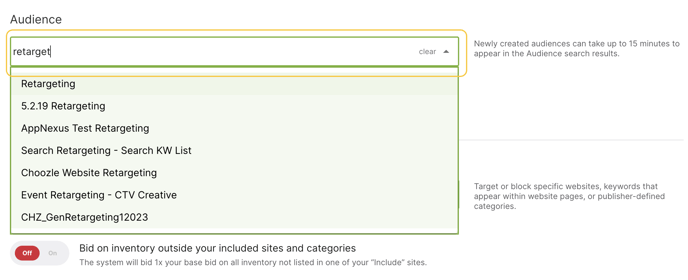
When building or editing an ad group, select your retargeting audience from the Audience Targeting dropdown.
-
Since retargeting inventory tends to be more limited, it’s common to set higher CPM bids. Choozle suggests starting bids of $4–$7 CPM for display retargeting.
-
Choose geolocation (for example, U.S.) or other layers as appropriate for your campaign.
Retargeting Internationally
-
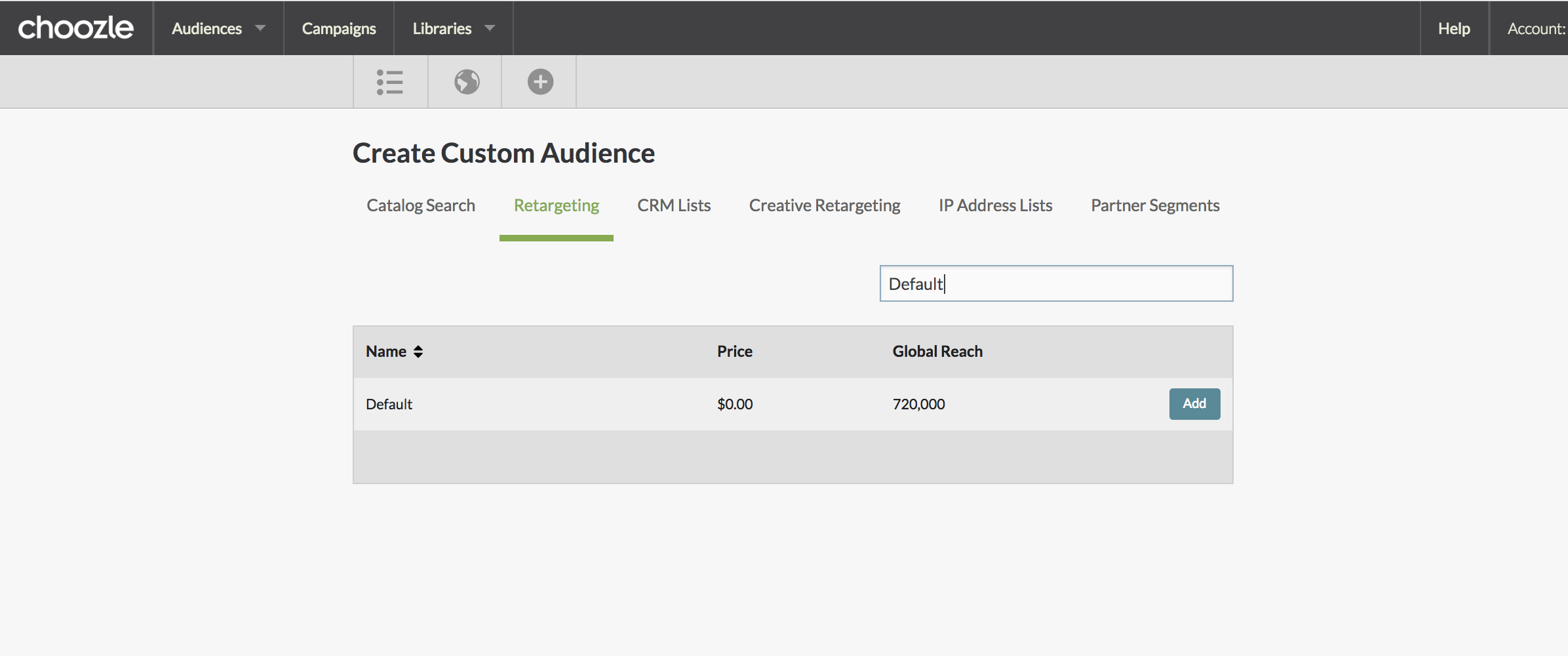
If your advertiser account is set to the European Union region, Choozle automatically includes a Default IAB-compliant pixel in your Smart Container Tag.
-
This Default pixel collects consented user profiles, which typically makes this audience 3x larger than standard retargeted segments
-
To use it: navigate to Audiences → Retargeting, find the segment called “Default”, and include it in your audience builder.

Best Practices & Optimization Tips
-
Let your tag collect data: Allow at least 30 days of tag firing before launching a retargeting campaign — this ensures a more robust audience pool.
-
Consider cross-device targeting: Enabling cross-device expands reach but comes with an additional CPM cost (Choozle typically charges + $1 CPM for this)
-
Segment your audiences: Use different retargeting segments (site visitors, converters, clickers) across separate ad groups. This helps tailor your creative and bid strategy for each behavior type.
-
Adjust bid strategy: Because retargeting pools are smaller and higher-intent, bid more aggressively to win the inventory.
-
Exclude converters: If someone already converted, you might want to exclude them (or serve a different message) to reduce wasted spend.
-
Monitor churn: Since profiles expire (90 days), monitor the size and performance of your retargeting pools over time.
Strategic Use Cases
-
B2B / ABM: Retarget site visitors who visited your pricing, demo, or “contact us” pages to re-engage high-intent accounts.
-
E-commerce: Target users who added items to cart but didn’t complete checkout, or those who viewed product detail pages.
-
Lead generation: Retarget visitors who downloaded a content offer, visited a landing page, or partially filled out a form.
-
Brand engagement: Reconnect with users who consumed high-value content (blog, webinar, video) but didn’t convert.
Need Help?
If you have any additional questions please reach out to your Account Manager or Submit a Ticket.